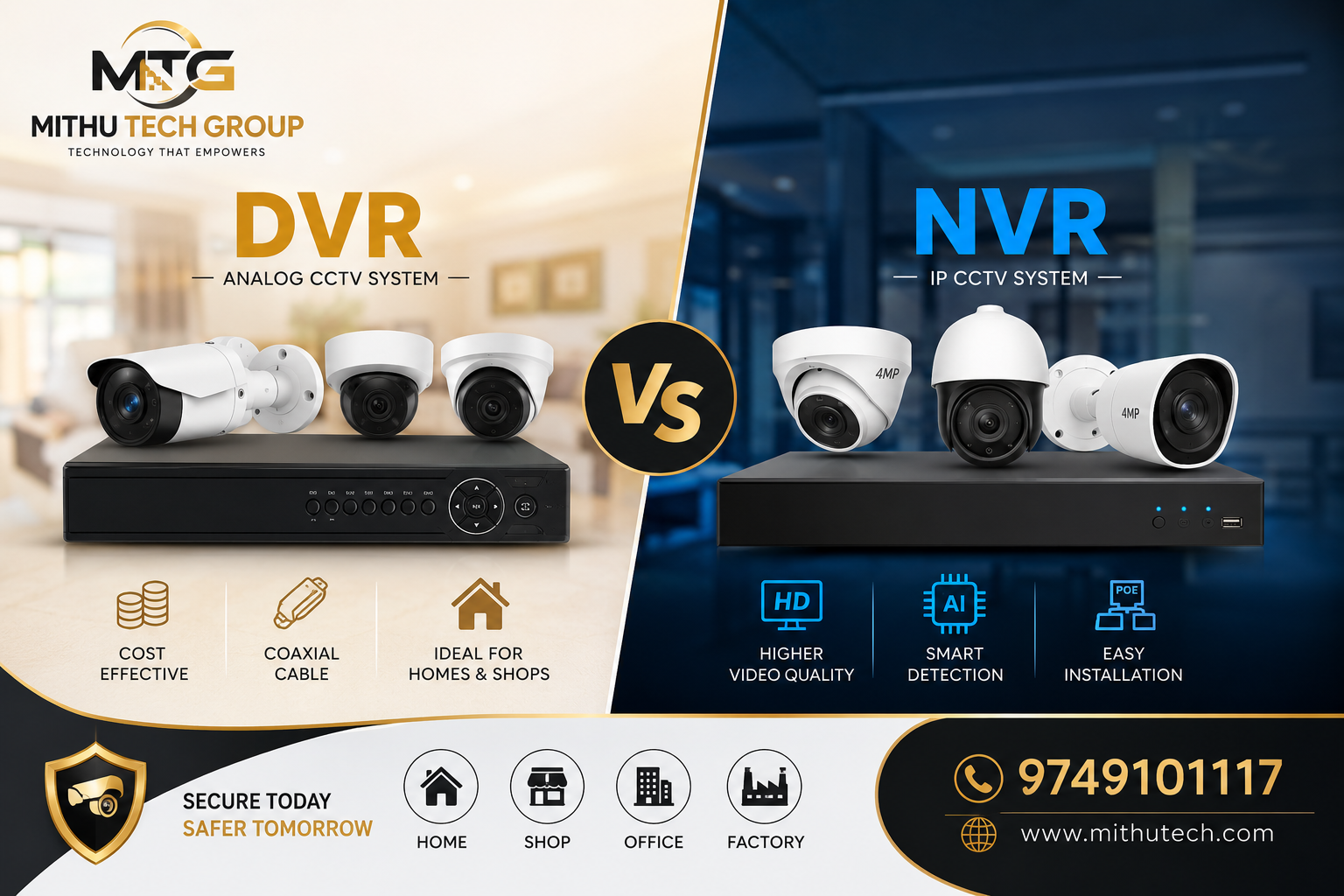
Compare DVR vs NVR CCTV camera systems. Learn the differences, advantages, disadvantages, installation costs, image quality, and choose the best CCTV security system.
DVR vs NVR CCTV Camera: Which Is Better?
If you are planning to install a CCTV security system for your home, office, shop, warehouse, apartment, school, hospital, factory, or commercial property, one of the biggest questions is:
Which CCTV camera is better—DVR or NVR?
Many buyers search online for:
- Best CCTV camera
- DVR vs NVR
- Which CCTV system is better?
- DVR or NVR for home
- Best CCTV camera for business
- HD CCTV camera
- IP CCTV camera
- Security camera buying guide
This comprehensive guide explains everything you need to know before investing in a CCTV surveillance system.
What is a DVR CCTV System?
DVR stands for Digital Video Recorder.
A DVR system works with analog CCTV cameras such as HD, TVI, AHD, CVI, and Analog HD cameras.
The cameras transmit video through coaxial cable, which connects directly to the DVR.
The DVR processes, compresses, stores, and manages recorded footage. security system
Components of a DVR CCTV System
A standard DVR CCTV package includes:
- DVR Recorder
- Analog CCTV Cameras
- Hard Disk Drive
- Coaxial Cable
- Power Supply
- BNC Connectors
- Power Connectors
- Mouse
- Monitor
- Internet Router (optional)
Advantages of DVR CCTV Systems
Affordable Price
DVR systems are considerably less expensive than IP camera systems.
They are ideal for:
- Small shops
- Houses
- Apartments
- Schools
- Small businesses
Easy Replacement
Individual analog cameras can be replaced without replacing the entire system.
Stable Recording
Even if the internet stops working, DVR systems continue recording.
Large Compatibility
Modern DVRs support:
- AHD Cameras
- TVI Cameras
- CVI Cameras
- CVBS Cameras
Many DVRs also support hybrid IP cameras.
Lower Initial Investment
If you already have coaxial wiring installed, upgrading becomes very economical.
Disadvantages of DVR
- Lower image quality than IP cameras
- Separate power cable required
- Limited AI features
- Limited scalability
- Cable length limitations
- More wiring required
What is an NVR CCTV System?
NVR stands for Network Video Recorder.
An NVR records video from IP Cameras connected through a computer network.
Instead of coaxial cable, IP cameras use:
- CAT5 Cable
- CAT6 Cable
- CAT7 Cable
- LAN Network
Most modern installations use PoE (Power over Ethernet) technology.
One cable provides:
- Power
- Video
- Audio
- Network
Components of an NVR System
Typical NVR package includes:
- NVR Recorder
- IP Cameras
- PoE Switch (if required)
- Network Cable
- Hard Disk
- Internet Router
- UPS
- Monitor
Advantages of NVR CCTV Systems
Crystal Clear Video Quality
IP cameras commonly provide:
- 2MP
- 4MP
- 5MP
- 6MP
- 8MP
- 12MP
- 4K Ultra HD
The image is much sharper than analog CCTV.
Smart AI Features
Modern NVR cameras offer:
- Human Detection
- Vehicle Detection
- Face Recognition
- Intrusion Detection
- Line Crossing Alerts
- Motion Detection
- Object Left Detection
- Object Removed Detection
- Crowd Analysis
- Heat Mapping
Easy Installation
With PoE technology:
- One cable
- Less wiring
- Cleaner installation
- Faster setup
Remote Viewing
Users can access cameras from anywhere using a smartphone.
Popular apps include:
- DMSS
- Hik-Connect
- CP Plus EVMS
- EZVIZ
- Uniview EZView
Audio Recording
Many IP cameras include:
- Built-in microphone
- Two-way audio
- Speaker
- Alarm output
Future Expansion
Adding new cameras is much easier.
Better Cybersecurity
Modern NVRs support:
- Encryption
- User permissions
- Secure remote access
- HTTPS
Disadvantages of NVR
- Higher cost
- Requires networking knowledge
- Better switches and cables required
- Premium storage recommended
DVR vs NVR Comparison
| Feature | DVR | NVR |
|---|---|---|
| Camera Type | Analog | IP Camera |
| Image Quality | HD | Ultra HD / 4K |
| Cable | Coaxial | CAT6 |
| Installation | Moderate | Easy (PoE) |
| Audio | Limited | Excellent |
| AI Features | Basic | Advanced |
| Smart Detection | Limited | Excellent |
| Remote Access | Yes | Yes |
| Future Upgrade | Moderate | Excellent |
| Price | Lower | Higher |
| Video Compression | H.264/H.265 | H.265+/H.265 |
| Business Use | Good | Excellent |
Which One Has Better Video Quality?
Winner: NVR
Reasons:
- Higher megapixels
- Better colour reproduction
- Digital transmission
- Less signal loss
- Superior night vision
- Improved zoom clarity
Which One Is Better for Home?
For most homes:
Budget-Friendly Option: DVR
If your priority is affordable security, DVR remains an excellent choice.
If your budget allows and you want long-term performance:
Best Choice: NVR
Which One Is Better for Shops?
Small Shops
DVR works well.
Large Retail Stores
NVR is highly recommended.
Which One Is Better for Offices?
NVR is the preferred solution because offices often require:
- Face recognition
- Attendance integration
- Visitor management
- Smart analytics
Which One Is Better for Factories?
Factories benefit from:
- AI monitoring
- Wide coverage
- High-resolution evidence
- Better storage efficiency
NVR is the better investment.
Which One Is Better for Apartments?
Apartment security requires:
- Entrance monitoring
- Lift surveillance
- Parking monitoring
- Visitor management
NVR systems are ideal.
Storage Comparison
DVR and NVR both support:
- 1TB
- 2TB
- 4TB
- 6TB
- 8TB
- 10TB
- 16TB Surveillance Hard Drives
Using H.265 compression significantly reduces storage consumption while maintaining image quality.
Night Vision Comparison
Modern NVR cameras provide:
- Full Colour Night Vision
- Smart Dual Light
- Warm LED
- Infrared Night Vision
- AI Night Detection
Traditional DVR cameras usually offer infrared night vision only.
Internet Requirement
Neither DVR nor NVR requires the internet for recording.
The internet is only required for:
- Remote viewing
- Mobile notifications
- Cloud backup
- Remote playback
Maintenance
DVR systems require periodic inspection of:
- Power supplies
- BNC connectors
- Coaxial cables
NVR systems mainly require:
- Network health checks
- PoE switch maintenance
- Firmware updates
Best Brands
Some of the most trusted CCTV brands include:
- CP Plus
- Hikvision
- Dahua
- Uniview
- Honeywell
- Axis Communications
- Bosch
- Panasonic
Buying Tips
Before purchasing, consider: security system
- Number of cameras required
- Indoor or outdoor installation
- Night vision capability
- Mobile app support
- Warranty
- AI features
- Storage capacity
- Future expansion
- Professional installation
Final Verdict
There is no single “best” option for everyone.
Choose DVR if you:
- Want an affordable CCTV system
- Already have coaxial wiring
- Need reliable security for a home or small shop
- Prefer lower installation costs
Choose NVR if you:
- Want the highest image quality
- Need AI-powered security features
- Plan to expand your surveillance system
- Require advanced analytics and easier long-term scalability
- Are securing a business, office, apartment complex, or industrial site
For most new installations in 2026, NVR-based IP CCTV systems are the better long-term investment because they provide superior video quality, smart detection, simplified PoE cabling, and greater flexibility. However, DVR systems continue to offer excellent value for budget-conscious users and remain a dependable choice for many homes and small businesses.
Conclusion
When comparing DVR vs NVR CCTV camera systems, the right choice depends on your budget, property size, and security requirements. If cost is your primary concern, a DVR system delivers reliable surveillance at a lower price. If you want cutting-edge technology, crystal-clear video, AI features, and future-ready performance, an NVR system is the clear winner.
Investing in the right CCTV solution today helps protect your family, employees, customers, and valuable assets for years to come.
FAQs – DVR vs NVR CCTV Camera (SEO Optimized)
General FAQs
1. What is a DVR CCTV camera system?
A DVR (Digital Video Recorder) system records video from analog CCTV cameras using coaxial cables.
2. What is an NVR CCTV camera system?
An NVR (Network Video Recorder) system records video from IP cameras over a network using LAN cables.
3. Which is better, DVR or NVR?
NVR offers better image quality and smart features, while DVR is more affordable.
4. Which CCTV system is best for home?
DVR is suitable for budget homes, while NVR is ideal for premium home security.
5. Which CCTV system is best for office?
NVR is recommended due to AI features and higher video quality.
6. Is NVR more expensive than DVR?
Yes, NVR systems generally cost more.
7. Does DVR need internet?
No. Internet is only required for remote viewing.
8. Does NVR require internet?
No. Recording works without internet.
9. Which has better video quality?
NVR.
10. Which has better night vision?
Modern NVR cameras usually provide better night vision.
Image Quality FAQs
11. Which supports 4K recording?
NVR.
12. Can DVR record Full HD?
Yes.
13. Which supports 8MP cameras?
NVR.
14. Is 2MP enough for home security?
Yes.
15. Is 5MP better than 2MP?
Yes.
16. Which is better for face recognition?
NVR.
17. Which gives sharper zoom?
NVR.
18. Which records true digital video?
NVR.
19. Can DVR cameras provide colour at night?
Some modern DVR cameras can.
20. Which is clearer for number plate recognition?
NVR.
Installation FAQs
21. Which is easier to install?
NVR with PoE.
22. What cable does DVR use?
Coaxial cable.
23. What cable does NVR use?
CAT5e or CAT6 cable.
24. Can NVR use one cable?
Yes.
25. Does DVR require power cable?
Yes.
26. What is PoE?
Power over Ethernet.
27. Can I install CCTV myself?
Yes, if you have basic knowledge.
28. Which is easier to expand?
NVR.
29. Can DVR work with old wiring?
Yes.
30. Which installation looks cleaner?
NVR.
Storage FAQs
31. Which uses less storage?
NVR with H.265 compression.
32. Can DVR support 1TB HDD?
Yes.
33. Can NVR support 16TB HDD?
Yes.
34. Which saves storage space?
NVR.
35. How long can 1TB record?
Approximately 10–30 days depending on settings.
36. Which supports cloud storage?
Both.
37. Can recordings be backed up?
Yes.
38. Which supports NAS storage?
Mostly NVR.
39. Can external HDD be connected?
Many systems support it.
40. Which is better for long recording?
NVR.
Features FAQs
41. Does NVR support AI?
Yes.
42. Can DVR detect motion?
Yes.
43. Which supports face detection?
NVR.
44. Can NVR recognise vehicles?
Yes.
45. Which supports smart alerts?
NVR.
46. Can DVR send mobile notifications?
Yes.
47. Does NVR support two-way audio?
Many models do.
48. Can CCTV detect humans?
AI cameras can.
49. Which supports line crossing?
NVR.
50. Which has better mobile apps?
Both offer excellent apps.
Cost FAQs
51. Which CCTV is cheaper?
DVR.
52. Is NVR worth the extra money?
Yes.
53. Which offers better value?
Depends on your needs.
54. Which has lower maintenance?
NVR.
55. Which has lower installation cost?
DVR.
56. Which has better ROI?
NVR.
57. Can CCTV reduce insurance risk?
Often, yes.
58. Does CCTV increase property value?
It can improve security appeal.
59. Is CCTV a one-time investment?
Mostly yes, with periodic maintenance.
60. Which is best under a limited budget?
DVR.
Home Security FAQs
61. Which is best for flats?
NVR.
62. Which is best for villas?
NVR.
63. Which is best for apartments?
NVR.
64. Which is best for shops?
DVR or NVR, depending on budget.
65. Which is best for schools?
NVR.
66. Which is best for hospitals?
NVR.
67. Which is best for warehouses?
NVR.
68. Which is best for factories?
NVR.
69. Which is best for farms?
DVR or NVR with weatherproof cameras.
70. Which is best for parking areas?
NVR.
Remote Viewing FAQs
71. Can I watch CCTV on my phone?
Yes.
72. Can I watch CCTV from another city?
Yes.
73. Which app works with DVR?
Brand-specific apps such as DMSS or Hik-Connect.
74. Which app works with NVR?
Brand-specific mobile apps.
75. Can multiple users access CCTV?
Yes.
76. Can I receive motion alerts?
Yes.
77. Can I replay recordings remotely?
Yes.
78. Does CCTV support cloud login?
Yes.
79. Can I share access with family?
Yes.
80. Can CCTV send email alerts?
Many systems support this.
Buying FAQs
81. Which CCTV brand is best?
CP Plus, Hikvision, Dahua, Uniview and Axis are among the leading brands.
82. How many cameras do I need?
It depends on your property size.
83. Is 4 cameras enough?
For many homes, yes.
84. Is 8 cameras enough?
Suitable for larger homes and small businesses.
85. Should I buy wireless CCTV?
Only if wiring is difficult.
86. Which camera is best for outdoor use?
Weatherproof IP66/IP67 cameras.
87. Which camera is best for indoor use?
Dome cameras.
88. Which lens is best?
It depends on the viewing area.
89. Which resolution is recommended?
4MP or higher for most new installations.
90. Should I choose AI cameras?
Yes, if your budget allows.
Final FAQs
91. Which CCTV lasts longer?
Both can last many years with proper maintenance.
92. Does CCTV work during power failure?
Only with UPS or inverter backup.
93. Can CCTV prevent theft?
It significantly deters crime.
94. Is CCTV legal?
Yes, when installed and used according to local laws.
95. How often should CCTV be serviced?
At least once a year.
96. Should firmware be updated?
Yes, to improve security and performance.
97. Can CCTV work without Wi-Fi?
Yes.
98. Which CCTV system is future-proof?
NVR IP Camera Systems.
99. Is NVR the future of CCTV?
Yes, because of AI, 4K quality and scalability.
100. What is the final recommendation: DVR or NVR?
If you want an affordable, reliable solution, choose DVR. If you want superior image quality, advanced AI features, easier expansion and long-term value, NVR is the best choice for most new CCTV installations.