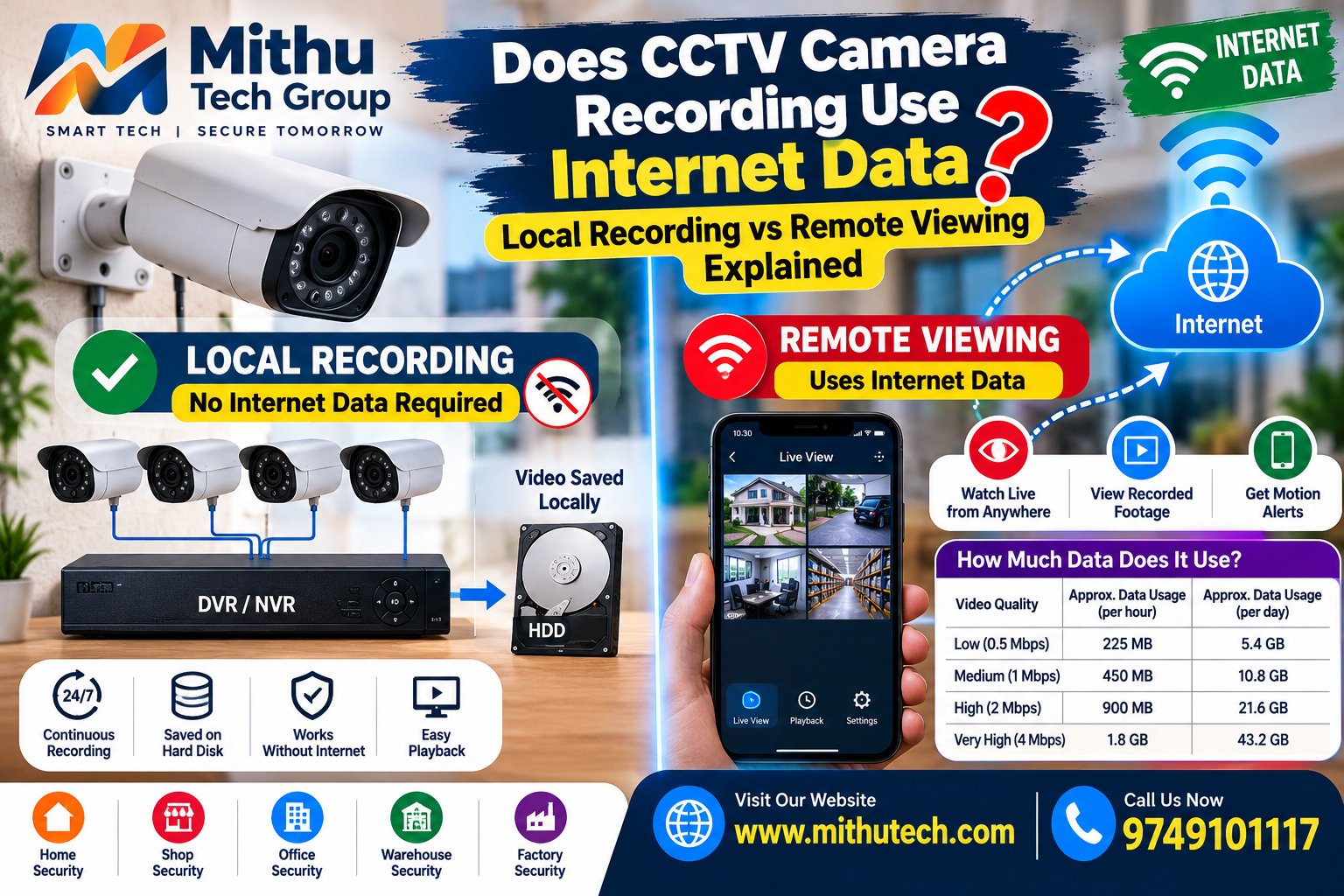
CCTV Camera Recording Use Internet Data: If you are planning to install CCTV cameras at your home, shop, office, warehouse or apartment, one question may come to mind: Does CCTV camera recording use internet data? Many people worry that installing security cameras will increase their broadband bill or consume all the data available on their mobile hotspot.
The answer depends on how your CCTV system is configured.
A conventional CCTV system with a DVR or NVR can record video locally on a hard disk without continuously using an internet connection. However, if you want to watch your cameras from another location, receive remote notifications or store footage in the cloud, an internet connection may be required. The amount of data used depends on camera resolution, video quality, recording settings, viewing time and the type of storage system.
Understanding the difference between local recording and remote viewing can help you choose the right CCTV setup and avoid unnecessary internet expenses.
In this guide, we will explain how CCTV cameras use internet data, how much data remote viewing can consume, whether cameras work without Wi-Fi, and how you can reduce data usage while maintaining reliable security.
1. Does CCTV Camera Recording Use Internet Data?
No, CCTV camera recording does not necessarily use internet data. When a camera records video directly to a DVR, NVR, memory card or another local storage device, the recording process can work without an active internet connection.
For example, imagine that you have installed four CCTV cameras at your shop. All four cameras are connected to a DVR, and the DVR has a hard disk installed. The cameras send video to the DVR, which saves the footage locally. Your broadband connection may be used for other activities, but the recording itself does not need to send video over the internet.
This is known as local recording.
Internet data becomes relevant when video or other information is transmitted through an internet connection. Common examples include watching live footage from your mobile phone while you are away, viewing recorded clips remotely, uploading video to cloud storage or using internet-based notifications and services.
It is important to distinguish between an internet connection and a local network. A CCTV camera may communicate with a recorder through Ethernet cables or a Wi-Fi router without sending any video outside the premises. A router can create a local network even when its internet connection is unavailable.
Therefore, the correct question is not simply whether a CCTV camera uses the internet. The important question is where the video is stored and whether the video needs to travel outside your local network.
2. What Is Local CCTV Recording?
Local CCTV recording means that video footage is saved on a storage device located at the same premises as the cameras.
This is one of the most common arrangements for residential, commercial and industrial security systems. It allows the system to continue recording even if the broadband connection fails, provided the cameras, recorder, storage device and power supply remain operational.
How local CCTV recording works
A typical local recording system works in the following way:
- The CCTV camera captures video.
- The video travels to a DVR, NVR or other compatible recording device.
- The recorder processes the video and saves it to a hard disk or other supported storage.
- The footage remains available for playback through a connected monitor or device on the local network.
An analogue HD camera generally sends its video signal to a compatible DVR. An IP camera usually sends video over an Ethernet network to a compatible NVR or another recording platform.
In either case, the video can remain inside the premises rather than being uploaded to the internet.
Does a DVR need internet to record?
No. A DVR can normally record video from compatible cameras without internet access, as long as the recorder, cameras, storage and power are working correctly.
You can connect a monitor directly to the DVR and watch live footage or review recorded clips. Internet access may be needed for particular online features, but it is not a basic requirement for ordinary local recording.
Does an NVR need internet to record?
An NVR also does not necessarily need internet access. IP cameras and an NVR can communicate through a local network, including a dedicated PoE switch or an appropriately configured network.
For example, eight IP cameras can send video to an NVR over Ethernet cables. The NVR can save that footage to its hard disk without uploading the video to an external server.
Some systems require additional network configuration for initial setup, licensing, activation or specific cloud features. Always check the manufacturer’s instructions for the exact model.
Main advantages of local recording
Local CCTV recording offers several benefits:
- No continuous internet requirement: Recording can continue while the internet connection is unavailable.
- No continuous cloud upload: Video stays on the local storage device unless you configure another destination.
- Predictable storage capacity: Retention depends mainly on disk capacity, video bitrate, recording hours and camera settings.
- Convenient local playback: A monitor connected to the recorder can display footage without remote streaming.
- Useful for unreliable internet connections: Shops, warehouses and other premises can maintain recording even when broadband is unstable.
However, local recording is not a complete substitute for every cloud feature. If the recorder is stolen, damaged or loses its storage, locally stored footage may also be lost. A suitable backup strategy can reduce this risk.
3. What Is Remote CCTV Viewing?
Remote CCTV viewing allows you to watch live camera feeds or recorded footage from outside the premises.
Suppose you own a shop in Durgapur but are visiting another city. You want to check whether the shop is open, see what is happening at the counter or review an event that occurred earlier. You open the CCTV application on your smartphone and select the camera.
That is remote viewing.
Depending on the system, the connection may use a manufacturer’s cloud service, a secure VPN, a configured remote-access service or another supported networking method. The exact setup varies by product.
How remote viewing uses internet data
When you open a live camera feed from a remote location, the video has to travel from your premises to your viewing device. This usually involves data being uploaded from the CCTV location and downloaded to your phone or computer.
Two separate internet connections may be involved:
- At the CCTV premises: The router’s internet connection carries video or related traffic outward.
- At your viewing location: Your phone or computer receives the stream using Wi-Fi or mobile data.
This distinction is especially important when your home or business has a limited broadband plan.
For example, if you watch your shop’s cameras while connected to mobile data, the CCTV system’s internet connection may upload video while your mobile plan downloads it. Both sides use network data, but the charges depend on the internet plans at each location.
Does opening the CCTV app use data?
Opening the app does not necessarily consume much data by itself. Browsing camera names, checking device status or receiving basic notifications may use relatively little data.
However, starting a live stream or playing a recorded video remotely can consume considerably more data because video is continuously transferred to your device.
The longer you watch, the more data you are likely to use.
4. Local Recording vs Remote Viewing: What Is the Difference?
The terms sound similar, but they describe two different activities.
| Feature | Local recording | Remote viewing |
|---|---|---|
| Main purpose | Save video footage | Watch footage from another location |
| Internet required? | Usually no | Usually yes |
| Uses internet data continuously? | Not if video remains local | Usually while streaming |
| Storage location | DVR, NVR, memory card or local storage | The video may still be stored locally; streaming sends it to your device |
| Works during an internet outage? | Usually yes, if the equipment has power and is working | Generally unavailable from outside the premises |
| Uses mobile data on your phone? | No, if you are not streaming remotely | Yes, when using mobile data to watch video |
| Cloud subscription | Not necessary for basic local recording | May or may not be needed, depending on the product |
| Typical example | Recording a shop overnight | Watching the shop cameras while travelling |
The most important point is that remote viewing does not automatically mean cloud recording. A system can store footage on a local hard disk while allowing you to watch that footage remotely.
Likewise, cloud recording and remote viewing are separate features. Some cloud-based systems store footage online, while others use local storage with optional remote access.
5. How Much Internet Data Does CCTV Remote Viewing Use?
CCTV internet data consumption varies widely. There is no single figure that applies to every camera because different systems use different resolutions, compression methods, frame rates and bitrates.
A useful way to estimate video data consumption is to look at the stream’s bitrate.
Bitrate is the amount of video data transmitted per second. It is commonly measured in megabits per second (Mbps).
For a rough calculation, a continuous video stream averaging 1 Mbps uses approximately:
- 450 MB per hour
- 10.8 GB over 24 hours
- 324 GB over 30 days
These are theoretical estimates using decimal units and a constant 1 Mbps bitrate. Actual usage may differ due to variable bitrate, audio, protocol overhead, stream switching and other network traffic.
Approximate data usage at different bitrates
| Average video bitrate | Approx. data per hour | Approx. data over 10 hours |
|---|---|---|
| 0.25 Mbps | 112.5 MB | 1.13 GB |
| 0.5 Mbps | 225 MB | 2.25 GB |
| 1 Mbps | 450 MB | 4.5 GB |
| 2 Mbps | 900 MB | 9 GB |
| 4 Mbps | 1.8 GB | 18 GB |
| 8 Mbps | 3.6 GB | 36 GB |
These values are illustrative estimates, not fixed consumption rates for particular camera resolutions. A camera’s actual bitrate can change with scene movement, image complexity, frame rate, codec and configuration.
Example: Watching one camera remotely
Suppose your CCTV camera sends a stream averaging 1 Mbps and you watch it remotely for 30 minutes.
At that bitrate, the stream would use roughly 225 MB of data over half an hour.
If you watch for two hours, the estimate rises to approximately 900 MB.
This is why opening a CCTV application occasionally is very different from leaving a live camera stream open throughout the day.
Example: Watching four cameras
Imagine that four cameras each transmit a stream averaging 1 Mbps and your application displays all four streams simultaneously.
The combined bitrate could be around 4 Mbps. Over one hour, that corresponds to approximately 1.8 GB of video data.
However, some applications display lower-resolution substreams in a multi-camera grid and use a higher-resolution stream only when you open one camera. In that configuration, usage can be much lower.
For this reason, always check whether your CCTV application is using the main stream or the substream.
6. Does CCTV Use Internet Data When Nobody Is Watching?
Not necessarily. It depends on whether the system is configured to transmit or upload anything continuously.
If your CCTV system records locally and no one is watching remotely, the video may remain on the recorder without a continuous internet upload.
Nevertheless, an internet-connected CCTV system may still exchange some data in the background. Depending on the equipment, this can include:
- Device status and connection checks
- Time synchronisation
- Cloud connectivity
- App notifications
- Firmware or software updates
- Remote-access service traffic
- Uploads of selected events or clips
These activities do not all have the same data requirements. Basic status traffic is generally much smaller than continuous video streaming, whereas uploading clips or cloud recordings can use significant data.
Some cameras also upload continuously to cloud storage, even when nobody opens the viewing app. In that case, the absence of remote viewers does not mean the system is using no internet data.
Practical advice: Check the camera’s storage and network settings to determine whether it records locally, uploads continuously or uploads only selected events.
7. Does CCTV Recording Use Wi-Fi?
No, CCTV recording does not always require Wi-Fi.
Wi-Fi is one way of connecting devices to a local network. It is not a requirement for every CCTV camera.
There are several common configurations.
Wired analogue CCTV
Analogue HD cameras usually connect to a compatible DVR using coaxial cable or another supported transmission arrangement. The DVR stores the recordings on its hard disk.
The camera-to-recorder connection does not need Wi-Fi.
Wired IP CCTV
IP cameras can connect to an NVR through Ethernet cabling. A PoE switch or PoE NVR may provide both network connectivity and electrical power over compatible Ethernet cabling.
This configuration can record locally without using Wi-Fi for the cameras.
Wi-Fi CCTV cameras
Wireless cameras connect to a compatible Wi-Fi network. Depending on their features, they may record to a memory card, a network recorder, a local hub or cloud storage.
A camera that uses Wi-Fi does not necessarily send all its video to the internet. It may communicate with a local recording device over the local network.
4G or SIM-based CCTV cameras
Some cameras use a SIM card and cellular data to provide remote connectivity. These systems may be useful where fixed broadband is unavailable.
However, the camera’s mobile connection can consume data when video is streamed remotely or uploaded to the cloud. The amount depends on the configuration and how frequently the footage is transmitted.
A SIM-based camera may support local storage, cloud storage or both. Check the specific model before choosing a data plan.
8. Can CCTV Cameras Record Without Internet?
Yes. Many CCTV systems can record without internet, provided the equipment is designed and configured for local recording.
This can be particularly useful in rural locations, construction sites, warehouses, shops or buildings where broadband is unreliable.
What you need for recording without internet
A basic local CCTV installation generally requires:
- Compatible CCTV cameras.
- A DVR or NVR, or cameras with supported local storage.
- A working hard disk, memory card or other supported storage medium.
- A suitable power supply or PoE arrangement.
- Correct camera-to-recorder connections and configuration.
If these components are working, recording can continue without a public internet connection.
What features may stop working?
During an internet outage, local recording may continue, but certain features may become unavailable:
- Remote viewing from outside the premises
- Push notifications that rely on internet services
- Cloud recording and remote cloud playback
- Remote configuration through an online service
- Some online device-management features
The exact behaviour depends on the product and its network configuration.
A local monitor connected to the recorder can often continue to show live footage and stored recordings. Devices on the same local network may also be able to access the system, depending on how it is configured.
Important point about power cuts
An internet outage and a power outage are different problems. A CCTV system may keep recording when the internet fails, but it generally cannot continue normally if its cameras or recorder lose power.
A suitable UPS or backup power system can help keep the equipment running during a power interruption. Battery-powered cameras may behave differently, so check the manufacturer’s specifications.
9. Does CCTV Use Data When Viewing Recorded Footage?
The answer depends on where you are viewing the footage from.
If you are standing at the premises and play a recording directly on a monitor connected to the DVR or NVR, that playback can take place locally without internet data.
If you are connected to the same local network, the video may also travel only across the local network. Local network traffic does not ordinarily count as internet data, although the exact arrangement depends on your equipment and connection.
However, if you are away from the premises and use your phone to play an old recording through a remote CCTV app, the recording generally has to be transferred over the internet.
This means that playing an old recording remotely can consume data just like watching a live feed.
The data usage depends on the selected video stream and how long you watch. Downloading an entire clip or exporting a long recording may use more data than viewing a short event.
If you need to review CCTV footage regularly, consider downloading important clips while connected to a suitable Wi-Fi network, where the application supports it. Always make sure that any exported footage is stored securely.
10. Does CCTV Cloud Storage Use Internet Data?
Yes. Cloud recording normally requires footage to be transmitted from the camera or recording system to an external storage service over an internet connection.
Unlike local recording, cloud storage depends on uploading data outside the premises.
For example, if a camera continuously uploads a stream averaging 1 Mbps, the theoretical upload volume is approximately 10.8 GB per day, or 324 GB over 30 days. This is an illustration of a continuous stream, not a prediction for every cloud camera.
Some cloud cameras record continuously, while others upload clips only when motion is detected. Event-based recording can reduce uploads considerably when the camera is in a quiet environment.
Actual usage can be affected by:
- Video resolution and compression
- Average bitrate
- Number of cameras
- Continuous or event-based recording
- Clip duration and frequency
- Audio recording
- Cloud service settings
Local storage versus cloud storage
Local storage generally keeps the video on a device at the premises. Cloud storage sends footage to an external service, which may provide remote access and an additional copy if the local equipment is damaged.
Local storage may be attractive if you want to minimise continuous uploads. Cloud storage may be useful if you need footage to remain accessible when the local recorder is unavailable or stolen, although it introduces subscription, privacy and internet-dependency considerations.
Some installations combine both approaches to balance local reliability with off-site backup.
11. How to Reduce CCTV Internet Data Usage
If your internet plan has a limited monthly allowance, you do not necessarily need to avoid remote CCTV viewing. You can reduce data consumption by adjusting how the system is used and configured.
1. Use the substream for mobile viewing
Many professional CCTV cameras and recorders support a main stream and a substream.
The main stream typically provides higher image quality for detailed viewing and recording. The substream is often configured with a lower resolution or bitrate for remote monitoring.
Use the substream when viewing several cameras on a mobile phone, if your system supports it. Switch to the main stream only when you need more detail.
2. Avoid leaving live video open unnecessarily
A CCTV app can continue streaming even when you are not actively paying attention to it.
Open the camera when you need to check something and close the live view when you finish. This simple habit can make a significant difference if you frequently use mobile data.
3. Lower the remote-viewing bitrate
If your camera or recorder lets you configure the remote stream, choose a bitrate that balances image quality with available bandwidth.
A lower bitrate usually means lower data consumption, but it can also reduce image detail. Avoid lowering quality so much that faces, vehicle registration plates or other important details become difficult to identify.
4. Use motion-based cloud uploads where appropriate
If your system supports event-based cloud recording, you may be able to upload footage only when motion or another configured event occurs.
This can reduce uploads in areas with little activity. However, busy entrances, roads or shop floors may generate frequent events, so the savings will depend on the environment.
Also ensure that the settings capture the events you actually need.
5. Use local recording for continuous footage
If you need round-the-clock recording but do not require every minute to be uploaded to the cloud, a properly configured DVR or NVR can store continuous footage locally.
You can then use remote viewing when required. If you also want off-site backups, consider uploading selected events or clips rather than assuming that all footage must be stored online.
6. Connect your phone to Wi-Fi for extended viewing
Watching several cameras for a long period can consume substantial mobile data.
Whenever practical, use a trusted Wi-Fi connection for extended remote viewing. Keep in mind that the CCTV premises will still upload the video through its internet connection, and your Wi-Fi network may have its own data limits.
7. Check the app’s auto-play settings
Some applications automatically start a live stream when the camera screen opens or continue displaying video while you navigate between screens.
If the app provides settings for automatic playback, stream quality or multi-camera layouts, configure them to match your needs.
8. Monitor router data usage
Some routers provide a traffic or bandwidth report. This can help you identify whether your CCTV system is responsible for unusually high upload traffic.
If your router cannot identify individual devices, you may need to review the recorder or camera settings, or temporarily compare network usage with the CCTV system’s internet access disabled. Do this only if you understand which remote features will stop working.
Never disconnect or change security settings in a way that leaves the property unprotected without considering the consequences.
12. Does CCTV Data Usage Depend on Camera Resolution?
Yes, but resolution is only one factor.
A 4MP or 8MP camera can generate more data than a lower-resolution camera when configured for a higher bitrate. However, resolution alone does not determine actual internet usage.
Other important factors include frame rate, compression, scene movement, image noise, lighting, encoding quality and the chosen stream.
For example, a camera monitoring a quiet room may need less bitrate than one watching a busy road. At night, image noise or movement in the scene may also affect the amount of data generated.
What about H.264 and H.265?
H.264 and H.265 are video compression standards used by many CCTV systems. H.265 can often provide comparable image quality at a lower bitrate than H.264, although the actual result depends on the implementation and settings.
If your cameras, recorder and viewing application support H.265, enabling it may reduce storage requirements and network traffic.
Before changing codecs, check compatibility across the complete system. Some older devices or applications may not support every codec or setting.
13. How Many Cameras Can One Internet Connection Support?
There is no universal camera limit for an internet connection because the answer depends on what the cameras are doing.
If all cameras record locally and are not continuously uploading footage, the internet connection may only need to handle occasional remote access and background traffic.
If multiple cameras stream remotely at the same time, the upload capacity of the CCTV premises becomes important. For example, four cameras streaming at an average of 1 Mbps each could require approximately 4 Mbps of video upload capacity, before allowing for overhead and other traffic.
If all four cameras continuously upload to the cloud, the system needs sufficient sustained upload capacity for the combined streams. It also needs enough monthly data allowance, if the internet plan has a usage cap.
When planning a CCTV installation, consider both:
- Bandwidth: How much video can be transmitted at the same time.
- Data allowance: How much data can be transferred over a billing period.
A connection may have sufficient bandwidth for occasional viewing but still be unsuitable for continuous cloud uploads if the monthly allowance is limited.
For larger systems, calculate the expected combined bitrate and allow extra capacity for other devices and network activity.
14. Can CCTV Work With a Mobile Hotspot?
Yes, many internet-connected CCTV systems can work with a mobile hotspot, provided their networking requirements are compatible.
For example, you may connect a compatible recorder or Wi-Fi camera to a hotspot to enable remote viewing. Some devices support only specific Wi-Fi bands or network configurations, so compatibility should be checked first.
However, using a mobile hotspot introduces practical considerations.
First, continuous cloud uploads can consume a large amount of cellular data. Second, mobile signal strength and network congestion can affect video quality. Third, some mobile connections use carrier-grade NAT or other network restrictions that can affect particular remote-access methods.
If you intend to use a SIM card or hotspot for a CCTV installation, check whether the camera or recorder supports the required connection method and whether the cellular plan permits your expected usage.
For systems that only need occasional remote viewing, a hotspot may be practical. For a large system with multiple cameras and continuous cloud recording, calculate the expected data requirement before choosing the plan.
15. What Happens to CCTV Recording When the Internet Goes Down?
For a system designed around local recording, an internet outage does not normally stop the cameras from recording.
The cameras can continue sending video to a DVR or NVR over their local connections, and the recorder can continue saving the footage to its hard disk.
However, the outcome depends on the installation. A camera that relies exclusively on cloud recording may lose the ability to save new footage when the internet connection fails. Some devices use local memory as a temporary backup, but that feature should never be assumed without checking the specifications.
During an outage, remote viewing from outside the premises is generally unavailable unless the system has an alternative connection.
Once the internet is restored, local recordings should remain available if the recorder continued working. The system may reconnect to its remote-access service automatically, but this behaviour varies by model and configuration.
For businesses that need reliable security, test the system before relying on it. Confirm that it records locally, that the storage is healthy, and that the intended remote-access features recover properly after a network interruption.
16. Is Local CCTV Recording More Secure Than Cloud Recording?
Neither local storage nor cloud storage is automatically secure in every situation. Security depends on the equipment, configuration, physical protection, access controls and maintenance.
Local recording keeps footage on-site, which can reduce the need to transmit video to an external storage provider. However, a recorder can be stolen, damaged or accessed by an unauthorised person if it is poorly protected.
Cloud storage can keep an off-site copy, which may help if the local recorder is damaged or stolen. On the other hand, cloud services require careful account protection and introduce dependence on the provider’s security, connectivity and retention policies.
For either approach, use strong, unique passwords, keep firmware updated, restrict access to authorised users and disable unnecessary services. Use secure remote-access methods supported by the manufacturer and avoid exposing recorder management interfaces directly to the public internet without appropriate security measures.
If footage includes customers, employees or visitors, also consider privacy, access permissions and the rules applicable to your location.
A well-designed system may combine local recording with secure off-site backup of important footage.
17. Which CCTV System Is Best for a Home or Business?
The best CCTV arrangement depends on your property, budget, internet connection, security requirements and how you intend to review footage.
For homes
A home user who mainly wants continuous recording and occasional mobile access may prefer cameras connected to a local DVR or NVR, with remote viewing enabled as needed.
A Wi-Fi camera with a memory card may be sufficient for a small area, provided its storage and reliability meet the household’s needs.
For retail shops
A shop may benefit from local recording because footage needs to be available for reviewing customer incidents, stock discrepancies and activity near the billing counter.
Remote viewing can help the owner check the premises when away. A substream can make checking several cameras from a phone more data-efficient.
For offices
Offices may require local recording, controlled remote access and a retention period suitable for their operational needs. The system should also account for privacy and restrict who can view recordings.
For warehouses and factories
Larger premises often need multiple cameras, dependable local storage and careful network planning. If the site has unreliable broadband, local recording can be especially important.
For sites without fixed broadband
A local DVR or NVR can provide continuous recording without a fixed internet connection. A cellular connection may be added for remote access where coverage and the data plan are suitable.
Before choosing equipment, determine the number of cameras, required resolution, retention period, lighting conditions, cabling options and remote-viewing needs. This will help avoid paying for features that are unnecessary or choosing a system that cannot support the intended use.
18. How to Check Whether Your CCTV Is Using Internet Data
If you already have CCTV installed and want to know whether it is consuming internet data, use the following checklist.
Step 1: Identify the storage method. Check whether the cameras record to a DVR, NVR, memory card, local hub or cloud service.
Step 2: Check the recording settings. Confirm whether recording is continuous, scheduled, motion-triggered or cloud-based.
Step 3: Check remote-viewing behaviour. Find out whether the mobile app starts a live stream automatically or uses a lower-resolution stream when showing multiple cameras.
Step 4: Review the router’s traffic information. If supported, look at upload and download traffic and identify the devices generating it.
Step 5: Check cloud settings. Look for continuous uploads, event uploads, cloud backups and any retention or synchronisation features.
Step 6: Compare usage over time. Note the internet usage before and after extended remote viewing, keeping in mind that other devices also consume data.
Step 7: Test local recording carefully. If appropriate, disconnect the internet connection while leaving the local network and equipment powered. Confirm that local recording continues and that the footage can be played back from the recorder.
Do not assume that a camera is offline simply because its live view is closed. Some models continue uploading footage or maintaining cloud services in the background.
19. Common Myths About CCTV Internet Data
Myth 1: Every CCTV camera needs the internet to record
Fact: Many CCTV cameras can record locally through a DVR, NVR or supported memory card without internet access.
Myth 2: Wi-Fi cameras always use internet data
Fact: A Wi-Fi camera can communicate over a local network. Internet usage depends on whether data is sent outside the premises.
Myth 3: Remote viewing uses data only when watching live footage
Fact: Remote playback, clip downloads and other video transfers can also consume data.
Myth 4: A CCTV app consumes no data when it is open but idle
Fact: Some apps exchange small amounts of background traffic, while an active video stream may use considerably more. Actual behaviour depends on the app and settings.
Myth 5: Higher-resolution cameras always use the same amount of data
Fact: Data usage varies with bitrate, codec, frame rate, scene activity and configuration, not resolution alone.
Myth 6: Local recording means footage is always safe
Fact: Local footage can be lost if the recorder, disk or premises is damaged or stolen. Secure storage and suitable backups are important.
Myth 7: Cloud recording and remote viewing are the same thing
Fact: Cloud recording stores video off-site. Remote viewing allows you to access video from another location. A system can offer remote viewing while keeping recordings on a local hard disk.
20. Frequently Asked Questions About CCTV Internet Data
Q1. Does CCTV camera recording use internet data?
Not necessarily. A CCTV system that records directly to a local DVR, NVR or supported memory card can record without using internet data for the video itself. Remote viewing and cloud recording can use internet data.
Q2. Can CCTV cameras record without Wi-Fi?
Yes. Wired CCTV cameras can connect to a DVR or NVR through compatible cables. Wi-Fi is not required for every CCTV system.
Q3. Does CCTV use data 24 hours a day?
It can, but it does not have to. Local recording can operate without continuously uploading video. A system configured for continuous cloud recording, however, may upload footage throughout the day.
Q4. How much data does CCTV use per day?
There is no fixed amount. As a rough example, a continuous stream averaging 1 Mbps uses approximately 10.8 GB per day. The actual usage of your CCTV system depends on its bitrate, recording method, number of cameras and network settings.
Q5. Does watching CCTV on my phone use mobile data?
Yes, if your phone uses cellular data to receive the video. Watching over Wi-Fi usually avoids using your phone’s cellular allowance, although the remote CCTV premises still needs to transmit the stream.
Q6. Does viewing CCTV from the same building use internet data?
Not necessarily. If the phone or computer accesses the recorder over the same local network, video may remain inside the premises. The exact setup matters, so confirm that the app is using a local connection rather than a remote service.
Q7. Does a DVR use internet data when recording?
The act of recording video to the DVR’s local hard disk does not inherently use internet data. Other online features may generate traffic if the DVR is connected to the internet.
Q8. Does an NVR require internet?
An NVR generally can record from compatible IP cameras over a local network without internet access. Internet access may be needed for remote viewing, cloud features or other online functions.
Q9. Will CCTV keep recording during an internet outage?
A locally recording system will generally continue recording if its cameras, recorder, storage and power supply remain operational. Cloud-dependent cameras may behave differently.
Q10. Does CCTV cloud storage consume data?
Yes. Cloud storage normally requires footage to be uploaded through an internet connection. The amount depends on whether the system uploads continuously or only sends selected events and clips.
Q11. Can I use a mobile hotspot for CCTV?
Many compatible systems can use a mobile hotspot or cellular connection. However, continuous uploads and frequent remote viewing can consume significant data, so check compatibility, coverage and the data allowance first.
Q12. How can I reduce CCTV data usage without losing important footage?
Use local recording where appropriate, choose a lower-bitrate remote stream, use substreams for mobile viewing, avoid leaving live feeds open unnecessarily and configure cloud uploads carefully. Do not reduce quality so much that critical security details become unusable.
Q13. Does motion detection reduce internet data usage?
It can, if the system is configured to upload or record only motion-triggered clips. Motion detection alone does not necessarily reduce data usage when the system continues uploading video continuously.
Q14. Can I view recorded CCTV footage without internet?
Yes, if you are at the premises and can access the recorder or storage locally. Viewing footage remotely from another location normally requires a suitable connection.
Q15. Is local CCTV recording enough for a business?
It may be enough for the basic requirement of recording footage, but the right setup depends on the business’s security needs. Some businesses also need remote access, off-site backups, longer retention or controlled access for multiple users.
21. Final Recommendation: Choose CCTV Based on Your Actual Internet Needs
So, does CCTV camera recording use internet data? Local recording usually does not require internet data for the video itself, but remote viewing and cloud recording can consume data.
If your main requirement is continuous security recording, a properly configured local DVR or NVR can be a practical solution. You can keep footage on a hard disk and use remote viewing when necessary.
If you need cloud storage, multiple remote viewers or continuous video access, estimate the upload bandwidth and monthly data requirement before choosing your internet plan. Remember that camera resolution is only one part of the calculation; bitrate, compression, viewing time and recording settings also matter.
Before buying a CCTV system, ask these questions:
- Do I need continuous local recording, cloud recording or both?
- How many cameras will operate at the same time?
- Will I watch the cameras remotely every day?
- Is my internet connection suitable for the expected upload traffic?
- How many days of footage do I need to retain?
- What happens to recording if the internet or power fails?
- Who should be allowed to view and export the footage?
Answering these questions will help you choose a system that balances security, cost, reliability and convenience.
If you need CCTV cameras for a home, shop, office, apartment or warehouse, Mithu Tech Group can help you understand the difference between DVR-based systems, IP cameras, local storage and remote viewing before selecting equipment. Visit Mithu Tech Group to learn more about the business and its services.
You can also explore GitaKart Seva for additional online services and resources.
A good CCTV system is not simply one that lets you watch cameras on a phone. It is one that records reliably, stores footage appropriately, provides secure access when needed and works within the limits of your internet connection.
When you understand how local recording and remote viewing work together, you can make a more informed decision and avoid unnecessary data consumption while keeping your property protected.