By Mithu Tech Group | Updated October 2026
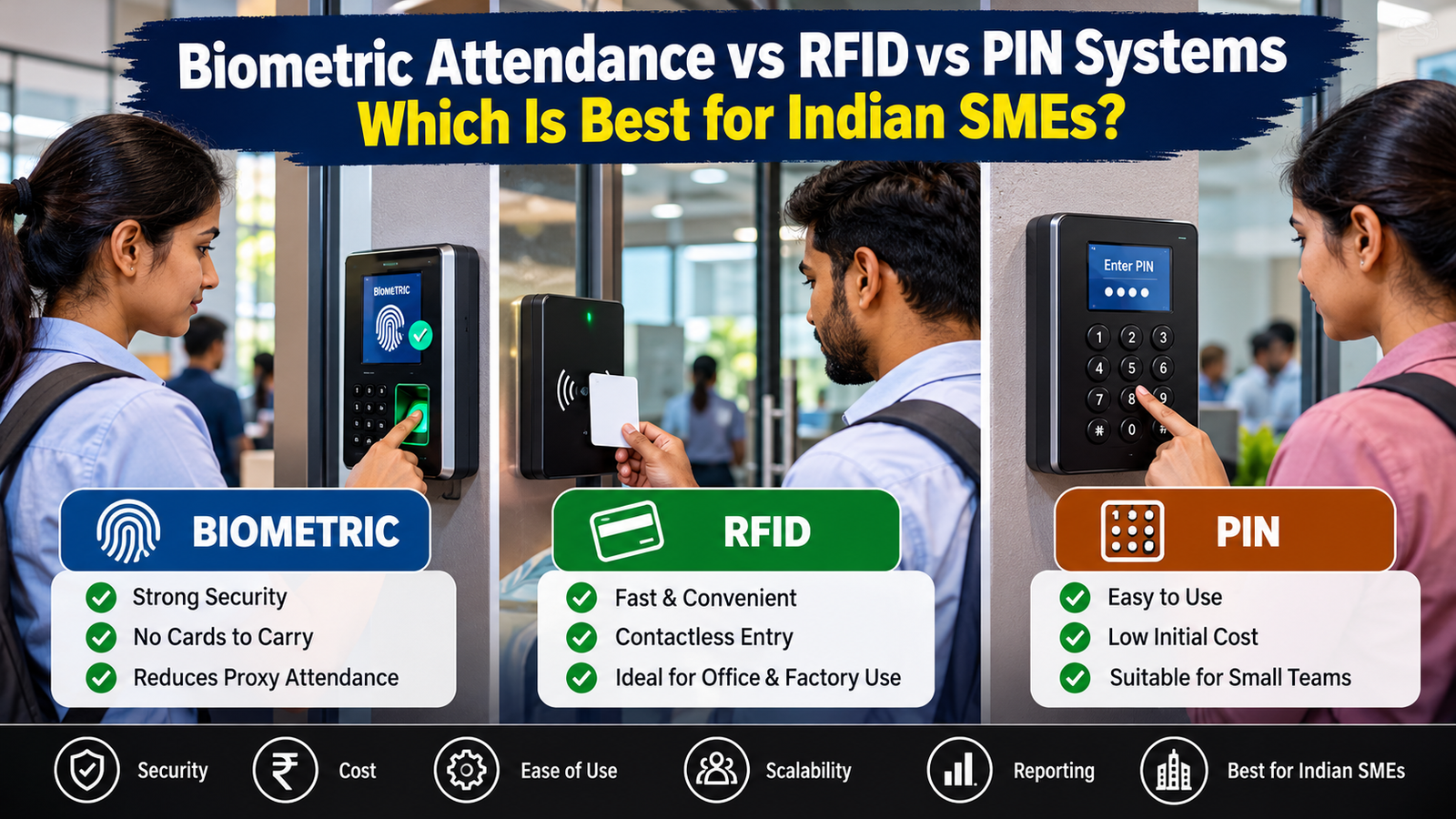
Biometric vs RFID vs PIN Attendance System: Running a small or medium-sized business in India involves managing employees, customers, inventory, payroll and daily operations. Yet one common problem continues to affect offices, factories, retail shops, schools, warehouses and service companies: maintaining accurate employee attendance.
Traditional attendance registers may appear inexpensive, but they can create administrative work, calculation errors, disputes over working hours and opportunities for proxy attendance. As a business grows, manually recording employee arrival and departure times becomes increasingly difficult.
Modern attendance systems offer a practical alternative. Three popular options are biometric attendance machines, RFID card-based systems and PIN-based attendance systems. Each uses a different method to identify employees, and each has advantages and limitations.
But which technology is best for an Indian SME?
The answer depends on the number of employees, workplace environment, security requirements, budget, payroll process and the level of accountability your organisation needs.
In this comprehensive guide, Mithu Tech Group explains how biometric, RFID and PIN attendance systems work, compares their costs and security considerations, and helps business owners choose a suitable solution.
Quick Answer: Which Attendance System Is Best?
For many Indian SMEs, a biometric attendance system is a strong choice when accurate employee identification and reducing proxy attendance are the main priorities.
An RFID attendance system may be better when employees need fast entry, contactless card scanning or integration with an existing access control system.
A PIN-based system can be appropriate for very small offices, low-risk environments or businesses looking for a straightforward entry-level solution.
There is no universal winner. A factory with shift workers has different needs from a small accounting office, a retail showroom or a multi-location company.
The best system is the one that reliably records attendance, fits the workplace, protects employee information and produces reports that management can actually use.
What Is an Employee Attendance Management System?
An employee attendance management system records when employees begin and finish work, and may also track breaks, overtime, late arrivals, early departures and shift schedules.
A typical installation consists of an attendance terminal, employee identification credentials, management software and a reporting process.
Depending on the model, attendance records may be stored locally, transferred through a computer network or synchronised with cloud-based software.
Modern systems can help businesses:
- Record employee check-in and check-out times.
- Reduce manual attendance calculations.
- Identify late arrivals and unauthorised absences.
- Generate monthly attendance reports.
- Support payroll preparation.
- Manage multiple shifts and departments.
- Maintain records for authorised audits.
- Integrate with door access control where supported.
However, installing a machine alone does not guarantee accurate payroll. Businesses must configure shift rules, overtime policies, holidays, missed punches and approval workflows correctly.
1. What Is a Biometric Attendance System?
A biometric attendance system identifies an employee using a physical or behavioural characteristic. Common workplace systems use fingerprints or facial recognition. Some specialised systems support other biometric methods.
Employees register their credentials during enrolment. When they arrive at work, they present the required biometric characteristic to the terminal. The device compares the submitted sample with its enrolled records and records attendance if verification succeeds.
Depending on the product, the system may store biometric templates locally or process information through another supported architecture. Buyers should confirm exactly what the device stores, where the records reside and how they are protected.
Advantages of biometric attendance
1. Stronger resistance to proxy attendance
An employee cannot ordinarily ask a colleague to scan their own fingerprint or face and successfully record attendance under another person’s identity. This makes biometric verification attractive for workplaces where accurate individual attendance is important.
Biometrics are not completely foolproof. Device quality, enrolment, spoof resistance and configuration still matter.
2. No physical card to carry
Employees do not need to remember a card or repeatedly enter a PIN. This can simplify routine attendance, particularly in workplaces with large teams.
3. Useful for shift-based workplaces
Factories, production units, warehouses and service centres often have several shifts and frequent employee movements. A suitable biometric terminal combined with properly configured software can simplify attendance reporting.
4. Better integration with workforce software
Depending on the model, biometric terminals can integrate with attendance software, payroll systems, employee databases and access control equipment.
Before purchasing, verify compatibility rather than assuming every machine supports every software platform.
5. Helpful management reports
Managers can use attendance data to investigate recurring lateness, missed punches, overtime patterns and absenteeism. Reports should be used consistently and according to established company policies.
Disadvantages of biometric attendance
Biometric systems also have practical limitations.
- Fingerprint recognition may struggle with worn fingerprints, cuts, dirty fingers or certain working conditions.
- Facial recognition performance can vary with lighting, camera quality, positioning and environmental conditions.
- Enrolment and employee support require time.
- The terminal needs reliable power, maintenance and suitable connectivity where network features are used.
- Biometric information requires careful protection because it cannot be replaced as easily as a lost card or forgotten PIN.
- Employees need an alternative process when the device cannot verify them.
For example, a factory worker who regularly handles cement, grease, metal components or chemicals may have dirty or damaged fingertips. In such an environment, facial recognition, RFID or a hybrid system could be more practical.
Who should choose biometric attendance?
Biometric attendance is worth considering for:
- Manufacturing units and factories.
- Offices with substantial employee strength.
- Schools and educational institutions.
- Warehouses and logistics operations.
- Businesses with recurring proxy-attendance concerns.
- Organisations requiring individual verification at entry points.
The final selection should be based on a workplace trial, especially where employees work with their hands or in dusty, humid or outdoor environments.
2. What Is an RFID Attendance System?
RFID stands for Radio Frequency Identification. An RFID attendance system uses a reader and a compatible card, tag or other credential to identify an employee.
An employee presents the assigned card or tag to the reader. The terminal reads its identifier and records the associated attendance event.
Many businesses use contactless RFID credentials because employees can register attendance quickly without touching a fingerprint sensor.
However, RFID is a family of technologies. Cards operating at different frequencies or using different credential standards are not necessarily interchangeable. Always verify compatibility between the card, reader and access control equipment.
Advantages of RFID attendance
1. Quick and convenient check-in
Employees can usually present their cards in seconds. This is useful at busy entrances where many workers arrive around the same time.
2. Contactless operation
The employee does not need to touch a biometric sensor. This can be useful in industrial environments, healthcare settings or workplaces where hands may be dirty.
3. Simple replacement process
If a card is lost, an administrator can generally deactivate it and issue a replacement, provided the system supports credential management.
4. Suitable for access control integration
RFID readers are frequently used in door access systems. With compatible equipment, a business may use the same credential for attendance and authorised door entry.
For example, an employee could use an assigned card to record attendance and unlock an authorised entrance. These functions must be configured and supported by the chosen hardware and software.
5. Useful for temporary or changing workforces
Contractors, temporary staff and site personnel can be assigned and withdrawn credentials through an appropriate administrative process.
Disadvantages of RFID attendance
The most important limitation is that a card proves the credential was presented, not necessarily that its assigned employee presented it.
- Employees may lend cards to colleagues.
- Lost cards may be misused until deactivated.
- Businesses must purchase, issue and manage credentials.
- Readers and cards must use compatible technology.
- Card replacement creates a small but recurring administrative burden.
- More secure card technology can cost more than basic credentials.
RFID attendance is therefore not automatically less secure than every biometric system, nor is it automatically more secure than a PIN terminal. The result depends on credential security, reader design, operating procedures and the risk being addressed.
Who should choose RFID attendance?
RFID is a strong candidate for:
- Retail shops and showrooms.
- Offices with moderate security requirements.
- Schools and training centres.
- Warehouses with contactless entry needs.
- Shared office buildings.
- Businesses already using compatible RFID access control.
For organisations concerned about card sharing, RFID can be combined with a second verification factor where the system supports it.
3. What Is a PIN-Based Attendance System?
A PIN-based attendance system identifies an employee using a personal identification number entered on a keypad.
The employee enters an assigned code, and the terminal records the attendance event if the code is valid.
Some systems are dedicated attendance terminals, while others are integrated into door access control equipment. Features vary by model.
Advantages of PIN attendance
1. Low credential cost
A basic PIN system does not require a separate card for every employee or biometric enrolment.
2. Easy to understand
Most employees already know how to enter a numeric code. Training requirements can be minimal.
3. No biometric enrolment
Businesses that prefer not to collect biometric information can consider PIN-based attendance as one possible alternative.
4. Convenient for small teams
A small office with a limited number of employees and relatively low attendance-related risk may find a PIN system sufficient.
5. Straightforward administration
Administrators can assign, change or deactivate codes, depending on the terminal’s management features.
Disadvantages of PIN attendance
PIN systems have a significant weakness: a code can be shared.
An employee might give their PIN to a colleague, intentionally or otherwise. Other employees may observe a code being entered. Weak or repeated PINs can also make unauthorised use easier.
Additional risks include:
- Forgotten PINs.
- Employees choosing predictable numbers.
- Codes being written near the terminal.
- Difficulty identifying who actually entered the code.
- Administrative effort when codes need to be reset.
Businesses can reduce these risks through individual codes, suitable PIN-length requirements, regular access reviews and clear rules against sharing credentials. However, procedures cannot completely eliminate the risk of deliberate sharing.
Who should choose PIN attendance?
A PIN-based solution may be suitable for:
- Very small offices.
- Low-risk workplaces.
- Temporary installations.
- Businesses with a tight initial budget.
- Locations where a simple fallback method is required.
For higher-risk workplaces, a PIN alone may not provide sufficient assurance that the correct employee is present.
4. Biometric vs RFID vs PIN: Detailed Comparison
The following table summarises the main differences. Actual performance depends on the device, configuration and workplace.
| Feature | Biometric | RFID | PIN |
|---|---|---|---|
| Identification method | Fingerprint or face | Card or tag | Numeric code |
| Separate credential needed | Usually no card | Yes | No card required |
| Resistance to routine proxy attendance | Generally stronger | Lower if cards are shared | Lower if PINs are shared |
| Contactless option | Facial recognition; model-dependent | Yes | Keypad entry |
| Credential replacement | Re-enrolment may be needed | Issue a new card | Reset or issue a new code |
| Privacy considerations | Higher sensitivity | Credential and activity data | Credential and activity data |
| Busy-entry convenience | Good with suitable capacity | Very good | Depends on keypad and user speed |
| Main operational issue | Verification failures and data protection | Lost or shared cards | Shared or forgotten PINs |
| Access-control integration | Model-dependent | Common where compatible | Model-dependent |
| Best-fit example | Factory or office requiring individual verification | Contactless office entry | Small, low-risk office |
Important: This is a practical comparison, not a universal security ranking. A poorly configured biometric terminal may perform worse than a well-managed RFID installation. A secure RFID credential with appropriate anti-passback controls may provide stronger access control than a basic biometric device.
5. Which System Is Best for Indian SMEs?
To make the right decision, consider your workforce size, operating environment and attendance policy.
Small businesses with 5–20 employees
A small office may not need an expensive enterprise system. A basic PIN terminal or an affordable biometric machine can be sufficient.
Choose PIN attendance if convenience and low initial cost are the main priorities and the risk of credential sharing is acceptable.
Choose biometric attendance if individual verification matters more and the working environment is suitable.
RFID is worth considering if the business already has compatible access cards.
SMEs with 20–100 employees
At this size, managers may benefit from automated reporting, shift configuration and payroll exports.
Biometric attendance is often a practical shortlist option because it reduces reliance on cards or codes that can be shared. RFID remains attractive for contactless entry and compatible door-access integration.
Prioritise software quality, reporting and technical support rather than selecting a terminal on price alone.
Factories and industrial units
Factories may have shift rotations, large arrival queues, dusty environments, outdoor gates and employees whose fingerprints are affected by their work.
Test the terminal under real operating conditions. Consider facial recognition or RFID if fingerprint performance is unreliable.
A combination of RFID for authorised access and biometric verification for attendance may be appropriate where security and operational needs justify the additional expense.
Retail shops and showrooms
Retail businesses often need to monitor opening shifts, closing shifts, weekly holidays and late arrivals.
A biometric or RFID terminal can be appropriate, depending on whether individual verification or fast contactless entry is more important.
If the business has several branches, check whether the software can consolidate attendance reports across locations.
Schools, coaching centres and training institutes
These organisations may need staff attendance, shift management and sometimes separate student attendance functionality.
Choose a system based on the actual requirement. Do not assume an employee attendance product automatically provides suitable student-management features.
Warehouses and logistics companies
Warehouses may have high employee turnover, temporary workers, multiple gates and demanding working conditions.
RFID can simplify credential issuance and contactless entry. Biometric attendance can provide stronger individual verification. Hybrid systems may be worthwhile when the risk and scale justify them.
6. Initial Cost vs Total Cost of Ownership
One of the most common purchasing mistakes is comparing only the price of the attendance machine.
A lower-priced device may require additional software, manual reporting or more frequent support. A more expensive system may save administrative time, but only if its features are actually needed.
Your total cost may include:
- Attendance terminal and installation.
- RFID cards or tags, where applicable.
- Attendance or workforce-management software.
- Network wiring and connectivity.
- Power backup.
- Configuration and employee enrolment.
- Maintenance and technical support.
- Replacement credentials or components.
- Payroll integration or subscription charges.
How to calculate the real business value
Consider a hypothetical SME with 50 employees.
Suppose manual attendance checking and correction take 30 minutes each working day. At 26 working days per month, this equals 13 hours of administrative time monthly.
If a suitable automated system reduces this workload by half, it saves approximately 6.5 administrative hours per month.
This is an illustrative example, not a guaranteed saving. Actual results depend on how the business currently manages attendance and how accurately the new system is configured.
To calculate return on investment, compare the value of time saved and errors avoided with the full installation, software and maintenance costs.
Do not assume that automation will eliminate every dispute or payroll correction. Missed punches, leave approvals and overtime rules still require a clear process.
7. What About Attendance Software and Payroll Integration?
The attendance terminal is only one part of the system.
A good attendance workflow should convert raw check-in and check-out events into useful reports.
Before purchasing, confirm that the software supports:
- Employee registration and department assignment.
- Shift schedules and weekly offs.
- Late-arrival and early-departure rules.
- Overtime calculation and approval.
- Leave and holiday management.
- Missed-punch correction requests.
- Monthly attendance reports.
- Export to your payroll workflow.
- Role-based administrative access.
- Backup and data export.
- Multiple locations, if required.
Ask the supplier to demonstrate the exact workflow using sample employees and shifts.
Also check whether the system continues recording attendance if the internet connection fails. Some terminals store events locally and synchronise later; others depend more heavily on connectivity. Confirm the behaviour of the specific model rather than assuming offline operation.
8. Security and Employee Privacy: What Indian Businesses Should Know
Attendance records can reveal employee movements and working patterns. Biometric records add a further layer of sensitivity.
Indian businesses should evaluate privacy and data-protection obligations before collecting employee information. The Digital Personal Data Protection Act, 2023, and the Digital Personal Data Protection Rules, 2025, are important official reference points. Applicability and commencement of specific provisions should be checked against current government notifications and the organisation’s circumstances.
Read the official legislation and rules:
- Digital Personal Data Protection Act, 2023 — India Code
- Digital Personal Data Protection Rules, 2025 — MeitY
A sensible implementation should follow these practices:
Explain the purpose. Tell employees what information is collected, why it is needed, how it will be used and whom to contact with questions.
Collect only what is necessary. Avoid gathering extra information merely because the software makes it possible.
Protect access. Restrict administrator accounts, use strong passwords and remove access when an employee leaves or a responsible manager changes roles.
Review storage and retention. Determine where records are stored, how long they are retained and how authorised deletion or archival is handled.
Ask about encryption and backups. Understand the supplier’s security controls, update process and incident-response arrangements.
Provide a practical fallback. Employees should have a documented procedure for device failures, injuries, verification errors or other exceptional situations.
Do not confuse a private attendance terminal with Aadhaar authentication. A standard fingerprint attendance machine is not automatically an Aadhaar-enabled authentication device. Businesses should not collect or use Aadhaar data casually for ordinary attendance. Any Aadhaar-based process requires a separate assessment of the applicable legal and technical requirements.
For official Aadhaar information, consult the UIDAI website.
9. Can You Combine Biometric, RFID and PIN Systems?
Yes, where the selected hardware and software support the required combination.
A hybrid system can provide different verification methods for different users or situations.
For example:
- RFID cards for routine authorised entry.
- Biometric verification for attendance recording.
- PINs for an approved backup process.
- Access-control permissions for restricted rooms.
- Centralised software for attendance reports.
However, combining methods is not automatically more secure. A system that permits employees to bypass biometric verification by entering a shared PIN may undermine the reason for deploying biometrics in the first place.
Define which method is used for each event, when a fallback is allowed and how exceptions are logged.
For example, an employee who cannot verify a fingerprint may submit a correction request for supervisor approval instead of allowing an unrestricted alternative check-in.
The aim should be a practical balance between security, employee convenience and reliable operations.
10. Common Mistakes When Buying an Attendance Machine
Buying only on the lowest price
A machine with limited reporting features may create extra manual work. Compare the complete package rather than the device alone.
Ignoring the work environment
Dust, humidity, lighting, dirty hands and high arrival volumes can affect performance. Test the device in the actual installation location.
Failing to check software compatibility
A terminal may not integrate with your preferred payroll system. Ask for a demonstration and confirm supported export formats before purchasing.
Ignoring backup and recovery
Ask what happens during power failure, network disruption or equipment breakdown. Confirm whether records can be recovered and exported.
Forgetting employee training
Employees and supervisors need to understand enrolment, missed-punch correction, leave approvals and shift rules.
Overlooking privacy
Do not assume that buying a biometric device automatically makes its data collection and storage practices appropriate. Review the supplier’s documentation and your own responsibilities.
Skipping after-sales support
Installation quality, configuration and support can matter as much as the terminal’s specifications. Confirm warranty terms, response times and maintenance arrangements.
11. A Practical Buying Checklist for Indian SMEs
Before finalising a purchase, ask your supplier the following questions:
- How many employees can the terminal support?
- How many attendance transactions can it store?
- Can it handle our shifts and weekly holidays?
- Does it support fingerprint, facial recognition, RFID or PIN?
- Which card technology and frequency does the reader support?
- Does it require continuous internet connectivity?
- Can attendance data be exported to our payroll workflow?
- Does the software support multiple branches?
- What happens when a fingerprint or face cannot be verified?
- How are employee records backed up and protected?
- Are software updates and support included?
- What is the warranty period?
- What are the installation and recurring charges?
- Can we test the device with our employees before buying?
- Can the system be expanded as the business grows?
Request a written quotation that separates hardware, installation, software, cards, cabling, taxes and recurring costs. This makes it easier to compare suppliers fairly.
12. Why Professional Installation Matters
Even a suitable attendance machine can cause problems when installed or configured incorrectly.
Poor placement can create queues. Weak network connectivity can interrupt synchronisation. Incorrect shift rules can produce misleading reports. Inadequate administrator controls can expose employee information.
A professional implementation should include requirement assessment, device placement, configuration, employee enrolment, reporting tests, administrator training and a clear support process.
Businesses that already have CCTV or door access control may also want to assess whether attendance equipment can be integrated with their existing setup.
Explore Mithu Tech Group’s CCTV and security solutions to learn more about related security and access-control services. For additional background on business surveillance, read Best CCTV Camera Dealer in Durgapur: CCTV Installation Services.
13. Practical Recommendation: Which System Should You Choose?
Here is a straightforward decision framework.
Choose biometric attendance when:
- Individual employee verification is a high priority.
- Proxy attendance is a recurring concern.
- The workplace supports reliable biometric capture.
- The business can manage the associated data-protection responsibilities.
Choose RFID attendance when:
- Contactless check-in is important.
- Employees already use compatible access cards.
- Cards can be issued and managed properly.
- Fast entry and door-access integration are priorities.
Choose PIN attendance when:
- The team is small.
- Attendance-related security risks are relatively low.
- A simple, economical solution is sufficient.
- The business can manage PIN-sharing risks.
Choose a hybrid system when:
- The business has multiple types of users or entrances.
- Attendance and physical access require different verification policies.
- The additional hardware and administration are justified.
For many SMEs, the best starting point is to shortlist one biometric model and one RFID option, test both in the actual workplace, and compare their reporting features and total costs. Consider PIN-only attendance if the operational requirements are modest.
Conclusion
Biometric, RFID and PIN-based attendance systems each solve a different operational problem.
Biometric attendance offers a practical way to strengthen individual verification. RFID provides fast, contactless credential-based attendance and can work well with compatible access-control systems. PIN-based attendance is straightforward and may be economical for smaller, lower-risk workplaces.
For Indian SMEs, the right choice is not simply the newest or cheapest machine. It is the system that fits the workforce, operates reliably in the local environment, supports payroll processes, protects employee information and can be maintained over time.
Before making a purchase, define your requirements, compare complete quotations, test the equipment and confirm the supplier’s support arrangements.
Need help selecting an attendance or access-control solution?
Mithu Tech Group provides CCTV and security-related services in Durgapur and nearby areas. Contact the team to discuss your workplace requirements and identify a suitable solution.
- Phone: 9749101117
- Email: info@mithutech.com
- Website: https://mithutech.com/
Ask for a quotation covering the required hardware, installation, software compatibility and ongoing support.
Frequently Asked Questions
1. Which is better: biometric or RFID attendance?
Biometric attendance is generally preferable when individual identity verification is the main priority. RFID is often preferable for fast, contactless entry and compatible access-control integration. The best choice depends on the workplace and system configuration.
2. Is a biometric attendance machine suitable for a small office?
Yes. It can be suitable even for a small office if the business needs reliable individual verification and can manage the device’s cost, maintenance and privacy responsibilities.
3. Can RFID attendance be manipulated?
Yes. If an employee shares a card, another person may be able to record attendance using it. Credential controls, prompt card deactivation and additional verification can reduce this risk.
4. Is PIN attendance secure?
PIN attendance can be adequate for low-risk environments, but shared, observed or predictable PINs weaken accountability. Individual codes and sensible administrative controls are important.
5. Does an attendance machine need internet access?
Not always. Some devices store records locally and synchronise later, while others depend on network services for particular functions. Confirm the specific model’s offline capabilities.
6. Can attendance systems calculate salary automatically?
Some attendance software supports payroll calculations or exports. Accurate results still depend on properly configured shifts, leave, overtime, holidays and correction approvals.
7. Can an attendance system control office doors?
Some terminals integrate with access-control hardware. Confirm compatibility and distinguish between recording attendance and authorising entry.
8. What should an SME check before buying an attendance machine?
Check employee capacity, reporting, shift management, offline operation, software compatibility, data security, warranty, installation charges and after-sales support.
9. Is fingerprint attendance always more reliable than facial recognition?
No. Performance depends on the device and environment. Fingerprints can be difficult to capture in some industrial conditions, while facial recognition can be affected by lighting and positioning. Testing is recommended.
10. Can an SME use RFID and biometric attendance together?
Yes, if the selected equipment and software support the combination. The business should define exactly when each credential is used and how verification failures are handled.
11. Does a fingerprint attendance machine automatically use Aadhaar?
No. Ordinary workplace fingerprint attendance and Aadhaar authentication are different systems. Do not assume that a standard attendance machine connects to UIDAI.
12. Where can businesses in Durgapur enquire about attendance and security solutions?
Businesses can contact Mithu Tech Group through https://mithutech.com/ or call 9749101117 to discuss related security and access-control requirements.
Editorial note: Product specifications, prices, compatibility, warranty and legal requirements can change. Verify them with the supplier and consult current official government guidance before implementation.